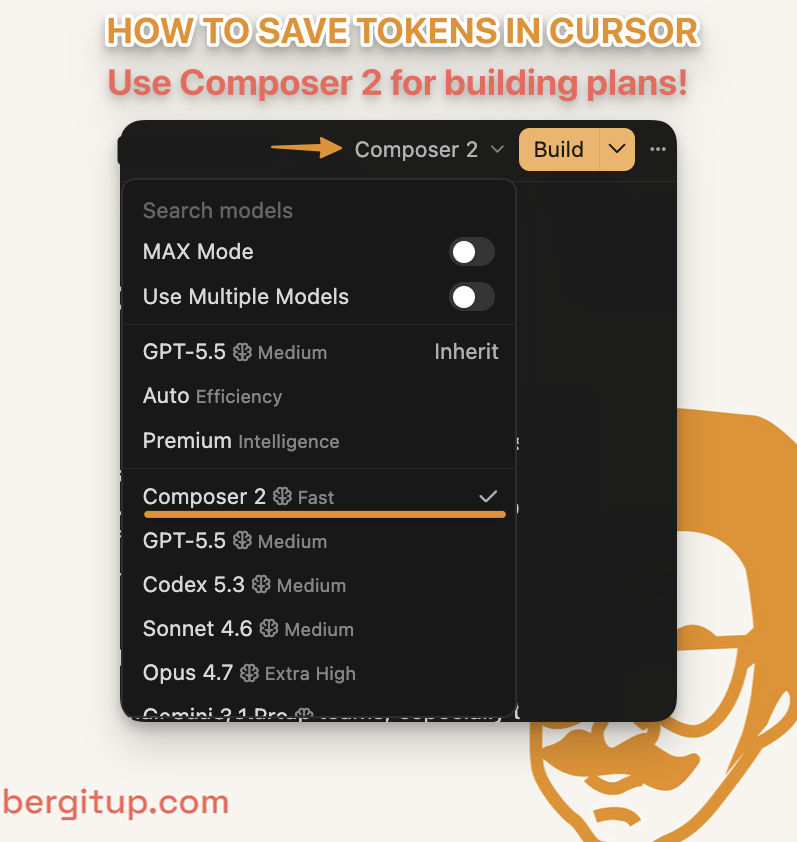
Cursor IDE gets cheaper when you stop using frontier models for every step of the build. My current workflow is simple: use GPT-5.5 or Opus 4.7 to make the plan, then switch to Composer 2 Fast to execute it.
That one change saves tokens, speeds up the edit loop, and keeps the bigger models available for the moments where they actually matter.
I used to let Sonnet or Opus plan and code the whole feature. It worked, but I kept running into plan limits faster than I wanted. The issue was not the model quality. The issue was using expensive reasoning tokens on work that was already defined.
The Cursor IDE Mistake I Was Making
The mistake was treating every step in Cursor like it needed the smartest available model. Planning, coding, debugging, small edits, cleanup, copy changes, test fixes. Same model, same expensive loop.
That feels fine for the first few prompts. Then the feature gets messy. You ask for another pass, another fix, another refactor, another test update. By the end, the premium model has spent a lot of tokens doing execution work a faster model could have handled.
I noticed this while building with Cursor across real projects, including the Kinship Careers build. The expensive part of AI development is not always the initial answer. It is the repeated loop: prompt, inspect, fix, rerun.
That loop needs speed as much as raw intelligence.
My Model Split: Plan First, Then Execute
My default Cursor workflow now has 5 steps.
First, I use a frontier model like GPT-5.5 or Opus 4.7 to think through the problem. I want it to identify the files, the risks, the implementation sequence, and the tests or checks that should pass when the work is done.
Second, I ask for a concrete plan. Not a vague strategy. I want file names, order of operations, likely edge cases, and the first thing to verify.
Third, I switch to Composer 2 Fast.
Fourth, I have Composer execute the plan one section at a time. Smaller batches make review easier and keep the agent from wandering into unrelated code.
Fifth, I bring the frontier model back only when something breaks in a way that needs deeper reasoning.
The split looks like this:
| Job | Model I reach for |
|---|---|
| Planning the approach | GPT-5.5 or Opus 4.7 |
| Executing clear steps | Composer 2 Fast |
| Repetitive cleanup | Composer 2 Fast |
| Debugging weird failures | GPT-5.5 or Opus 4.7 |
| Architecture decisions | GPT-5.5 or Opus 4.7 |
The expensive model does the thinking. The fast model does the reps.
Why Composer 2 Fast Works for Execution
Cursor describes Composer 2 as its coding model built for low-latency agentic coding. That matches where I get the most value from it: not as the model that decides the whole architecture, but as the model that moves quickly once the hard part has already been decided.
Once the model knows the target files, the expected behavior, and the implementation order, a lot of coding becomes pattern-following.
That is where speed matters.
If I need to update a component, follow an existing API pattern, clean up a refactor, add tests, or make 5 small edits across a codebase, I usually do not need the slowest and most expensive model available. I need a model that can move quickly and follow instructions.
Composer 2 Fast is also useful because faster responses change how you work. You iterate more often. You inspect smaller changes. You correct course before the agent builds too much in the wrong direction.
That is the real token saver. Smaller loops create fewer expensive mistakes.
When I Still Use Frontier Models
I still use frontier models in Cursor all the time. I just use them for the right jobs.
I bring GPT-5.5 or Opus 4.7 back when the bug is confusing, the architecture is unclear, or the change touches something risky like auth, payments, database schema, analytics, or shared infrastructure.
I also use a frontier model when I need a second opinion. If Composer executes the plan but something feels off, I want the bigger model to review the reasoning, not just patch the symptom.
Composer 2 Fast is great for coding, but I do not treat it as my best model for logic or writing. If I need to reason through a messy decision, write something that needs taste, or explain a trade-off clearly, I usually switch back to a bigger model.
This matters for client work too. When I build systems for small teams, the value is not only writing code quickly. The value is knowing which decisions deserve more thought and which ones just need a clean implementation pass. That is the same logic behind how I approach AI-native builds and workflow automation work.
A Simple Rule for Cursor Model Selection
Use frontier models in Cursor when the task requires judgment. Use Composer 2 Fast when the task requires execution.
If the work is “figure out what to do,” spend the premium tokens.
If the work is “do the steps we already agreed on,” switch to the faster model.
A simple version:
| Situation | Use |
|---|---|
| Unclear problem | Frontier model |
| Clear plan | Composer 2 Fast |
| Weird bug | Frontier model |
| Repeated edits | Composer 2 Fast |
| Risky system change | Frontier model |
| Boilerplate or cleanup | Composer 2 Fast |
This is not about always picking the cheapest model. It is about matching the model to the job.
The Practical Takeaway
Cursor plan limits disappear faster when every step runs through premium models. A split-model workflow gives you most of the quality with less token burn, and it makes the whole build feel faster.
Use GPT-5.5 or Opus 4.7 to think through the plan. Use Composer 2 Fast to execute it. Bring the bigger model back when the work gets ambiguous, risky, or stuck.
That workflow has been the best balance I have found so far: faster loops, fewer wasted tokens, and better judgment reserved for the places where judgment actually changes the outcome.
If you want help setting up a Cursor workflow around your actual business, I help small teams build the rules, skills, and systems that make AI coding tools useful. Start with the services page or book a quick call.